Project · 2026
BackAtIt — the break reminder that makes you come back
The brief
This one started with my back.
Long stretches of work without standing up will do that, and the fix is not complicated — get up, walk about, sit back down. The hard part is remembering, and every reminder I tried was far too easy to wave away. A small notification in the corner of the screen, dismissed before I had even read it, and another hour gone.
The problem was never the reminding. It was that the reminder arrived while I was mid-thought, and anything polite enough to be ignorable got ignored.
So I built one that isn’t.
Who it’s for
Anyone whose body is quietly paying for their screen time. Developers, designers, writers, students, anyone at a desk for hours at a stretch — particularly if you already recognise the back ache, the stiff neck, the dry eyes, or the wrists that complain by Thursday.
It is also for the specific kind of person who has installed a break timer before and stopped noticing it within a week. That was me. The whole design is a response to that failure.
The part every other timer forgets
Most break reminders tell you to stop. Almost none tell you to start again.
That gap is where the good intentions go. You get up for five minutes, end up in the kitchen, then in a conversation, and forty minutes later you have lost the thread of what you were doing — so the next time the reminder fires, you ignore it, because breaks have started to feel expensive.
BackAtIt runs the whole loop. When your break is up, a second alert calls you back and keeps nagging until you answer it: a burst of alarm, then a longer and longer silence, then another burst. It is still going when you sit down, but it is not blaring continuously into an empty room while you are gone.
Getting back at it is the point. It is in the name.
Why it is hard to ignore
Three decisions do most of that work.
- It takes the whole screen. Not a corner notification — the alert covers everything, so it cannot hide behind the window you are working in. It is easier to stand up than to argue with it.
- It ignores the keyboard completely. This is the one that matters most. A reminder always arrives mid-sentence, and if the alert can be dismissed by a keystroke, you will dismiss it without ever registering that it appeared. Nothing you type reaches it. Only a deliberate mouse click.
- The buttons wait three seconds. They stay greyed out with a small countdown, so a click already on its way to something else cannot land on them either.
Every one of those came from watching myself dismiss a break without noticing.
It stays out of your way
Being hard to ignore only works if it is not also annoying. Several things keep it from crossing that line:
- It knows when you are already away. If you have not touched the mouse or keyboard for a while when a break comes due, you are clearly already having one — so it stays quiet and counts it as taken care of, rather than alarming an empty room.
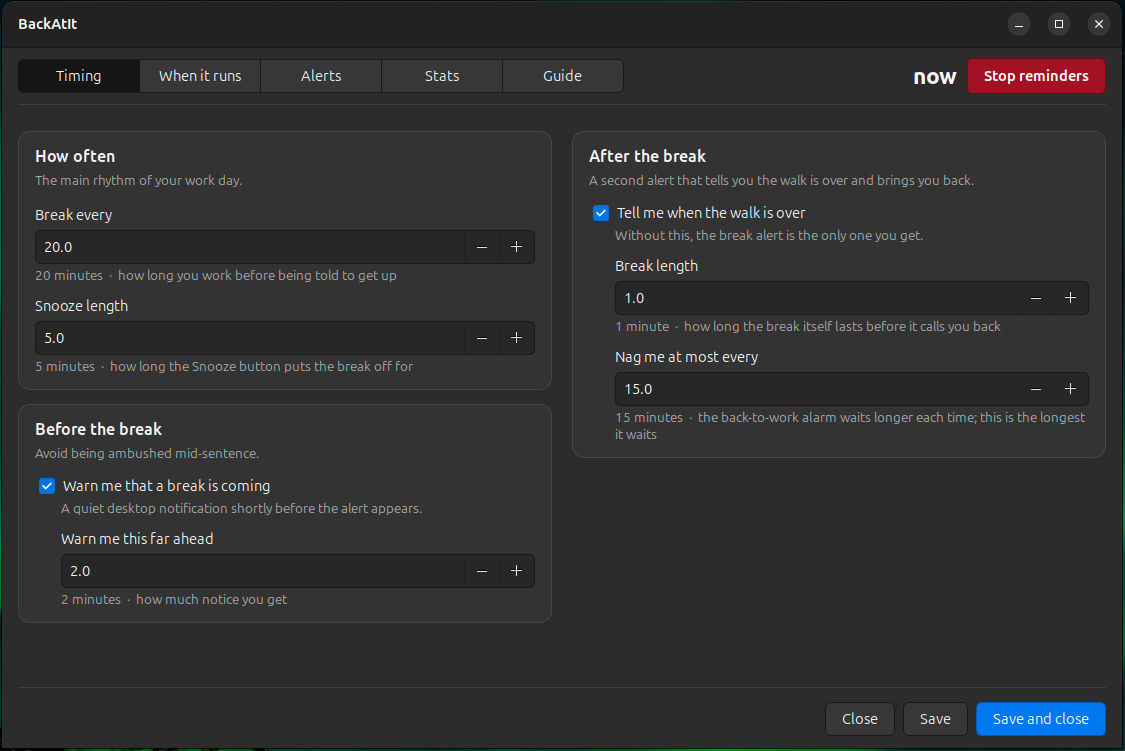
- It warns you first. A quiet notification a couple of minutes ahead, so a break never truly ambushes you mid-sentence.
- It runs on your hours. Set a daily schedule and it looks after itself. Days off are any combination you like — Fridays only, Monday-Wednesday-Friday, or the ordinary weekend.
- Snooze exists. Because sometimes you really are two minutes from finishing a thought, and a tool that refuses to acknowledge that gets uninstalled.
- Turning it off doesn’t punish you. Every alert carries a small, deliberately understated “turn off reminders” button. It stops today, not forever — your schedule is still there tomorrow.
Not only for walking
The heading and the message on both alerts are yours to rewrite. That sounds like a small thing and turned out not to be.
Set the interval to twenty minutes and the wording to “drink some water” and you have a hydration reminder. Set it to an hour with *“look at something far away”* and it becomes an eye-strain timer — the twenty-twenty-twenty rule, with a nag you can’t wave off. Change the sound too, and the same app can be a posture check, a stretch prompt, or a nudge to stand at a standing desk.
The two alerts even take different sounds, so you can tell “get up” from “come back” from the next room without looking.
Right now it runs one reminder at a time, so you pick the habit you are building. Running several at once is the next thing I want to build.
Knowing it is actually on
A background app you cannot see is a background app you stop trusting.
So the window keeps a live countdown in the top corner — if it is ticking, a break is coming. Underneath that, a Stats tab charts the last week or month: one row per day, split into breaks taken, snoozed, and skipped because you were already away.
That chart turned out to be the honest part of the whole project. It is very easy to believe you take regular breaks. It is harder to believe it while looking at a row of empty days.
Decisions I’d defend
- Full-screen by default, not a notification. A gentle reminder is a reminder you will learn to ignore. If it isn’t slightly inconvenient, it does not work.
- The countdown restarts when you answer, not when the alert appeared. However long an alert sits on screen, you still get a full working block afterwards. Punishing someone for being deep in a task is exactly backwards.
- Your settings outlive the app. Installing, upgrading and uninstalling never touch your configuration or your history. Removing it and putting it back leaves you where you were.
- It looks like it belongs. The window takes its colours from your desktop theme, so it sits correctly in a light or a dark setup rather than insisting on its own.
- Everything explains itself. Every setting has a line underneath saying what it does, and there is a Guide tab inside the app. Nobody should have to read a README to change how often they stand up.
Shipping it properly
It would have been easy to leave this as a script in my home directory. Making it something another person can actually install took its own pass:
- A .deb package —
sudo apt install ./backatit_1.0_all.debon any Debian, Ubuntu or Mint machine, with dependencies pulled in automatically. - An install script for everyone else, which checks what is missing first and tells you the package names for Debian, Ubuntu, Fedora and Arch.
- A desktop entry, icon set and store metadata, so it appears in the applications menu with its own logo like any other app rather than as a nameless script.
- A test suite covering the schedule logic, the daemon’s lifecycle, the alert window and the settings — because a program that wakes you up had better be right about when.
Built and tested on Ubuntu 24.04 with GNOME. It follows the freedesktop desktop standards, so other Linux desktops should be fine. It is Linux-only today, and honest about that.
MIT licensed — use it, change it, ship it.
What’s next
Three things, roughly in order:
- Several reminders at once. One for standing up, one for water, one for ringing your parents on a Sunday. That means intervals stretching from minutes to days, and reminders that survive a reboot — which is a real piece of design work, not a checkbox.
- A quieter setting per reminder. Taking over the screen is right for “your back hurts, stand up”. It is almost certainly wrong for *“drink water”* every twenty minutes. Each reminder should choose how loudly it interrupts.
- One language throughout. The interface is Python and the background timer is shell. Unifying them is the groundwork that makes the first two sane to build — and it is the sort of tidying that pays for itself the moment the feature list grows.
The result
A small app that has genuinely changed how often I stand up, which is the only metric that mattered. The back pain that started it is better. The stats page says the days I keep working through are the days I feel it — which is not a conclusion I would have reached on my own.
It was built in public, with Claude, over a run of evenings — and like most of what I build, the interesting part was not the code. It was noticing exactly how I had been ignoring every reminder that came before it.